Sonet3.2.6
Publisher Description
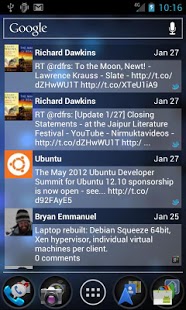
Sonet manages multiple social networking sites in one app or homescreen widget. This version is ad-supported. Sonet-Pro is an ad-free version.
Supports:
Twitter
Facebook
Google+
MySpace
Foursquare
LinkedIn
SMS
RSS
Identi.ca
Pinterest (read only)
Features:
posting
commenting
liking
location
update multiple accounts at once
instant photo upload to Facebook
Customizations:
text color
text size
background colors
Scrollable homescreen widgets for:
Honeycomb Launcher
Ice Cream Sandwich Launcher
ADW Launcher
Home++
LauncherPro
Go Launcher
Sonet may need to be reinstalled on Ice Cream Sandwich if the widgets aren't available.
Explanation of permissions:
RECEIVE SMS
-required to enabled SMS within the widget
READ CONTACT DATA
-required to enabled SMS within the widget
PREVENT DEVICE FROM SLEEPING
-required for updating with the screen off
COARSE (NETWORK-BASED) LOCATION
-required for network checking
FULL INTERNET ACCESS
-required to get status updates
About Sonet
The company that develops Sonet is Piusvelte. The latest version released by its developer is 3.2.6. This app was rated by 1 users of our site and has an average rating of 3.0.
To install Sonet on your Android device, just click the green Continue To App button above to start the installation process. The app is listed on our website since 2013-08-28 and was downloaded 38 times. We have already checked if the download link is safe, however for your own protection we recommend that you scan the downloaded app with your antivirus. Your antivirus may detect the Sonet as malware as malware if the download link to com.piusvelte.sonet is broken.
How to install Sonet on your Android device:
- Click on the Continue To App button on our website. This will redirect you to Google Play.
- Once the Sonet is shown in the Google Play listing of your Android device, you can start its download and installation. Tap on the Install button located below the search bar and to the right of the app icon.
- A pop-up window with the permissions required by Sonet will be shown. Click on Accept to continue the process.
- Sonet will be downloaded onto your device, displaying a progress. Once the download completes, the installation will start and you'll get a notification after the installation is finished.
Program Details
System requirements
Download information
Pricing
Version History
version 3.2.6
posted on 2013-08-28
3.2.5,-fixed Twitter support,3.2.3,-added Android backup service support,-lower memory usage,3.2.1,-fixed a bug with instant upload,3.2.0,-fixed a bug where photos could upload twice,3.1.9,-improved performance,-updated menus,-fixed widget loading bug on Android 4.0+,3.1.6,-resolve an error with the instant upload,3.1.5,-resolve an error loading the widget for some devices on ICS,3.1.4,-more options for the number of statuses loaded, keep the suggestions coming!
version 1.8.9
posted on 2011-04-01
Several fixes and updates
